

LESSON 08 · Your workspace
Ask The 🐵
Someone moved the tulips before the inspection. Rose thinks Leo knows who did it. Use Ask the Monkey to write their confrontation, then try a different first line for Rose.
1:40 · 1080p · Captions available · Playback starts only when you choose Play.
Read the plan before you run it
Open Notes and choose New Chat. On Mac you can use Shift+Command+W. On Windows use Ctrl+Shift+W. Name the scene, character or control you want to change. The Monkey replies in the script’s language. Its plan and completion lines are in English.
Read the numbered plan, then choose Run when the actions match what you asked for. Cancel leaves the plan unrun. While the Monkey is reading or working, the notice shows elapsed time and a Stop button. Use Stop to cancel the request. If a step calls for a picture, you choose the file. You also enter any key or password yourself.
From request to result
Follow the same practice copy of The Tulip Deal through all three requests. It starts with 12 scenes. Insert the new flower-tent scene before asking the Monkey to rewrite Rose’s line in scene 3.
| What you ask | What the Monkey plans | What happens |
|---|---|---|
| Write a new scene after scene 2 where Rose asks Leo who moved the tulips before the inspection. | Write the new scene and show the draft in the chat. | Run puts the draft in chat. Choose Insert into the script after reading it. The Scenes panel goes from 12 to 13. Look for INT. COUNTY FAIRGROUNDS – FLOWER TENT – MORNING at scene 3.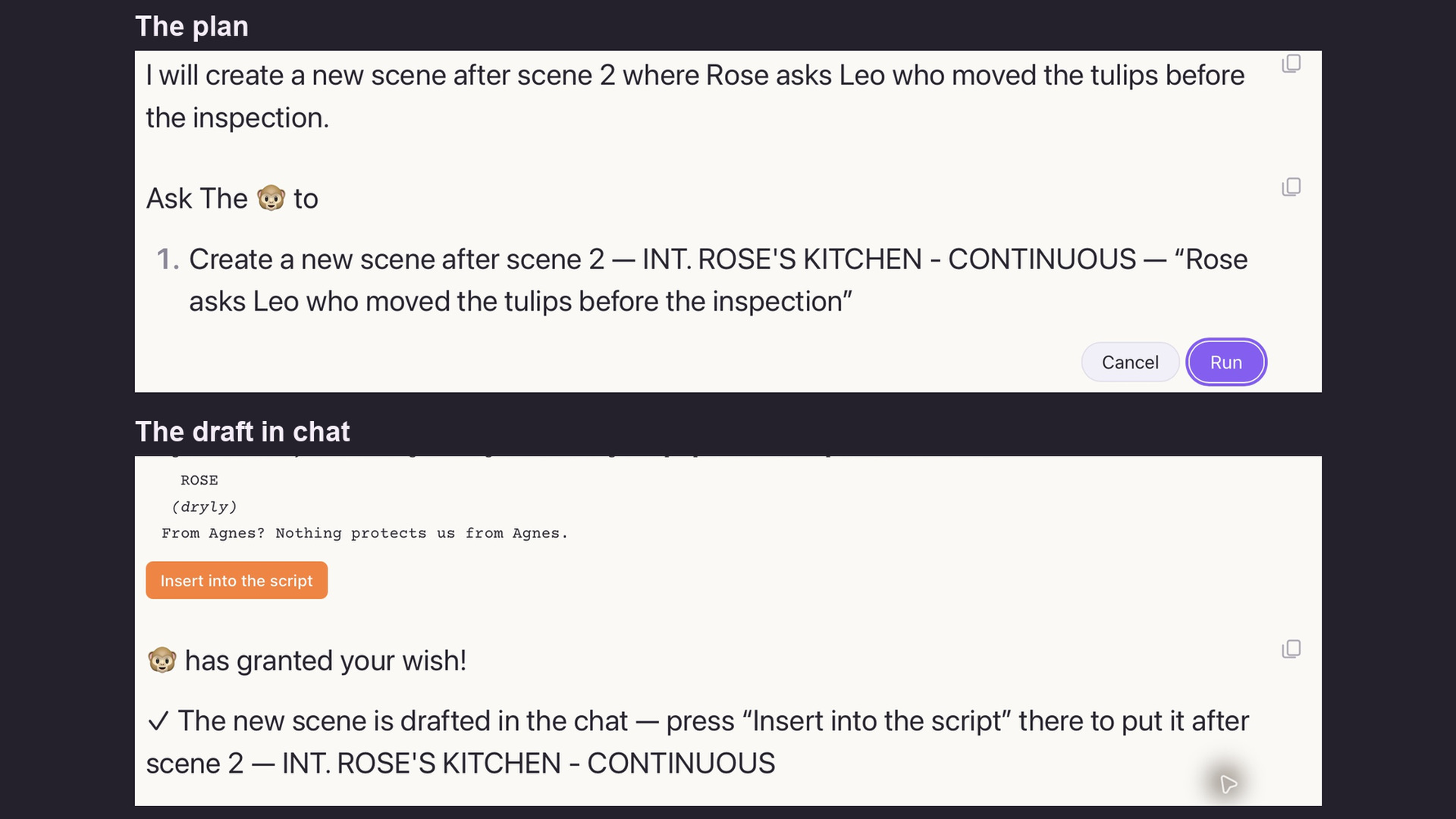 |
| Rewrite Rose’s first line in scene 3 so that she challenges Leo without raising her voice. | Rewrite the existing scene to change Rose’s first line and keep the other dialogue and action. | Run applies this rewrite directly. The completion line reads “Scene 3 rewritten.” Rose now asks, “Care to explain why these aren’t where I left them?”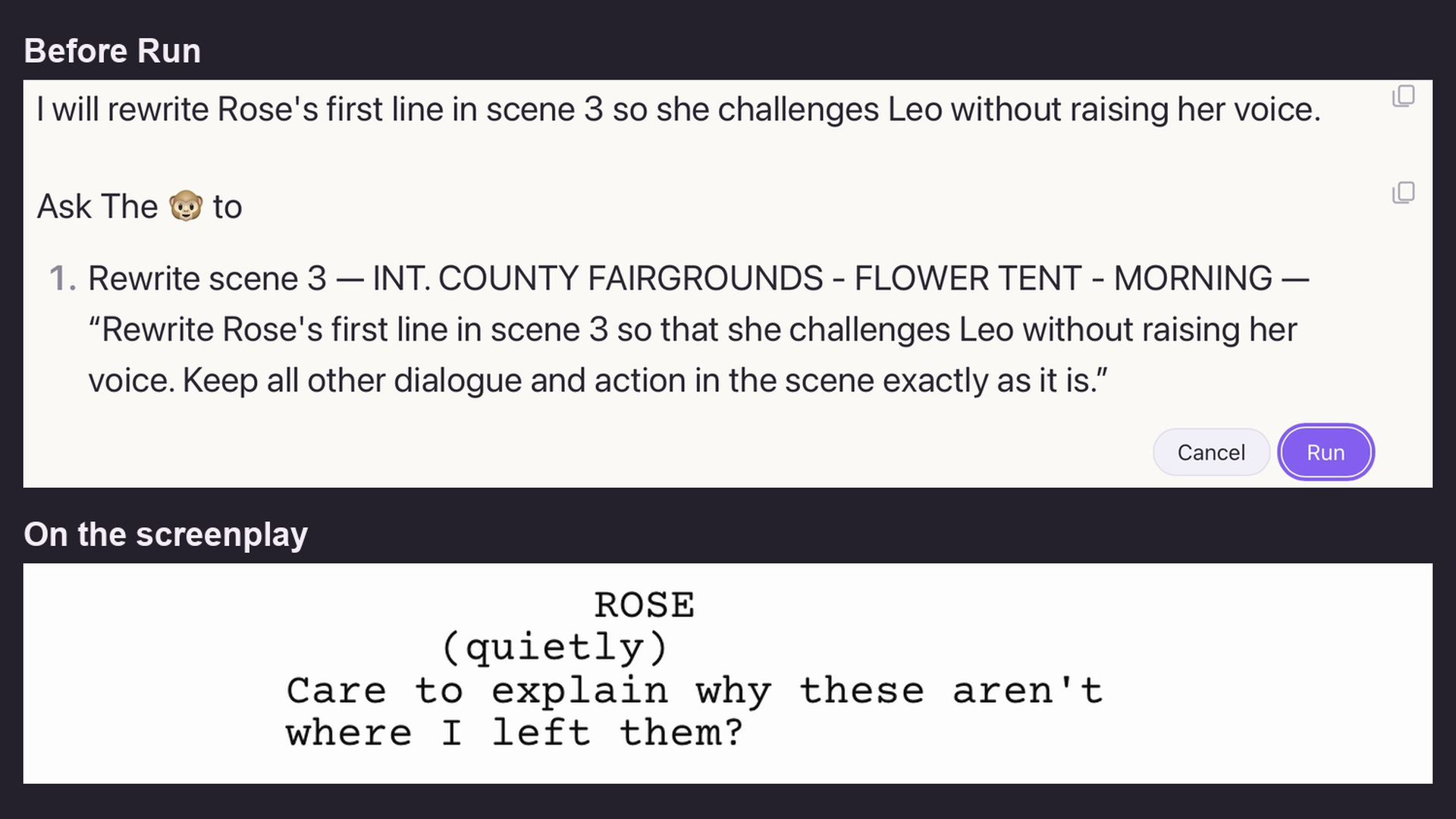 |
| Set the title to THE TULIP DEAL – SHOOTING DRAFT, add a page after the title page reading LOCATION NOTES, colour the first greenhouse scene red, colour Leo crimson, mark a new act above scene 3, and go to scene 3. | Set the title, add a page, colour one scene, colour one character, mark an act break and go to the scene. | Run completes all six steps. The first greenhouse is now scene 4 and is red. Leo’s dot is crimson. ACT TWO appears above the flower-tent scene. The chat has a tick for each completed step.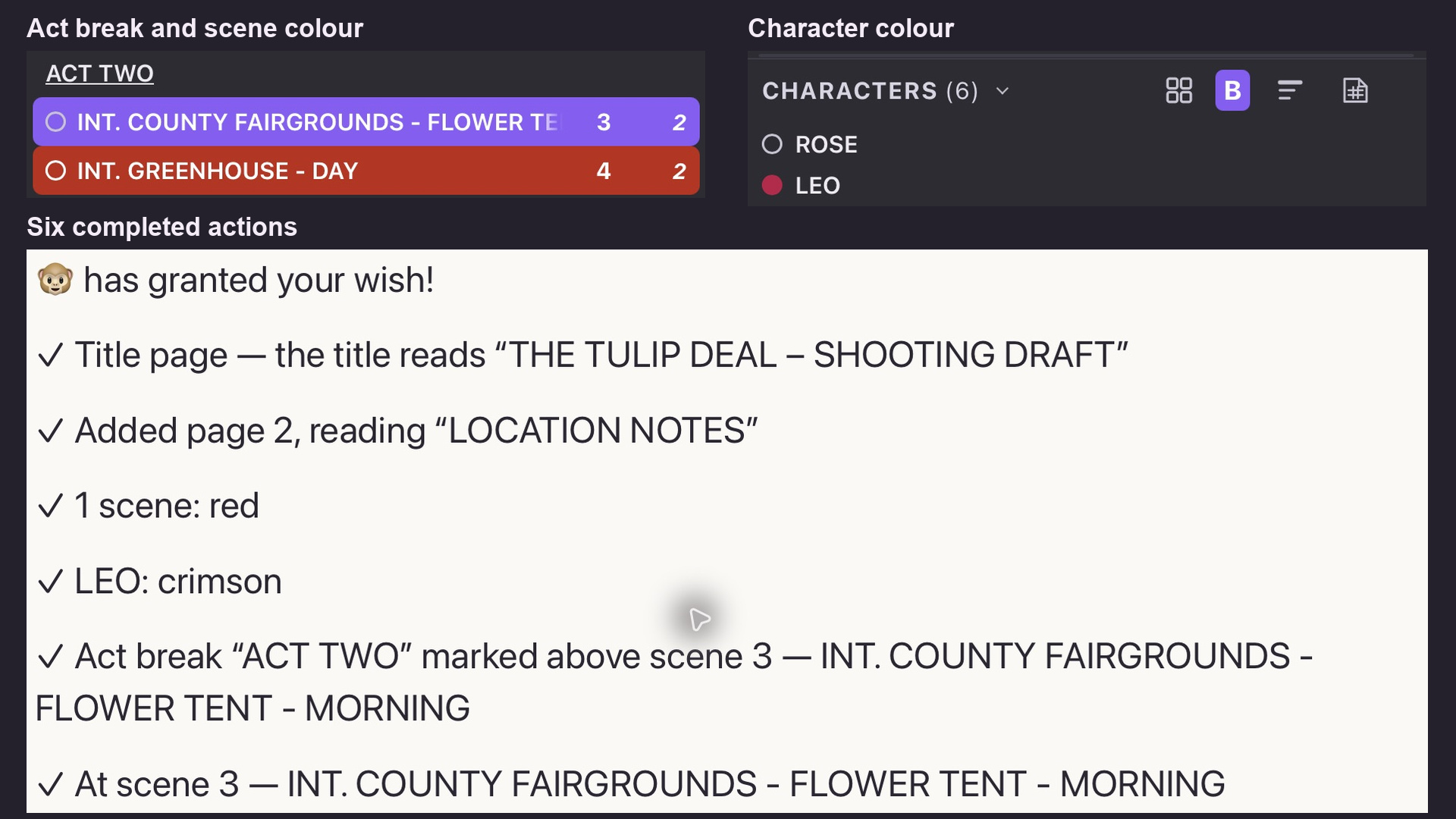 |
What changes when you press Run
These examples use a fresh copy of the screenplay. Its scene 3 is the greenhouse, and its title page starts with one company picture. Its added page has a separate location picture.
| What you ask | What the Monkey plans | What happens |
|---|---|---|
| Make the logo on the title page large. | Make one picture on the title page large. | The company logo changes to the large size. |
| Remove the images from the title page. | Remove the picture on the title page. | The chat reports one picture removed. The plan counts the pictures on your own cover. |
| Print CONFIDENTIAL in the header, make the header light, and go to scene 3. | Set the header text, switch it to Light, then go to the greenhouse. | Three ticks confirm the text, its print shade and scene 3. If Light is already on, leave that step out of your request. |
| Add a note to scene 2 saying Check the key prop, and rename DANA to DIANA everywhere in this screenplay. | Add the note to Rose’s kitchen scene, then rename Dana in cues and mentions. | The note is added. Three cues and two mentions change to DIANA in this copy. |
| Fix the format issues in this script. | Fix two lines by rule in a practice copy with two unfinished SUPER titles. | Both lines are repaired. The first now reads SUPER: “three days before the fair”. A clean copy reports that the format is already clean. |
| Translate scene 1 into Spanish and open the translation as a separate document. | Translate EXT. MAPLE STREET – MORNING into Spanish (Argentina) and open a new document. | The new document has one scene on one page. Its heading is EXT. CALLE MAPLE - MAÑANA. Translating that scene into English (US) opens a third document. |
Choose the kind of request
Start with what you want to change. A scene number, a character’s name or the exact words to print give the Monkey a target. Each example below was carried out in a practice copy of The Tulip Deal.
| Type | Example |
|---|---|
| Scene Building | Write a new scene after scene 2 where Rose asks Leo who moved the tulips before the inspection. |
| Edit Scenes | Rewrite scene 3 to make the argument shorter and sharper, preserving its existing heading and ending. |
| Dialogue | Rewrite Rose’s first line in scene 3 so that she challenges Leo without raising her voice. |
| Format | Fix the format issues in this script. |
| Translation | Translate scene 1 into Spanish and open the translation as a separate document. |
| Title Page | Set the title to THE TULIP DEAL – SHOOTING DRAFT. |
| Pictures and Added Pages | Make the logo on the title page large. |
| Style and Layout | Print CONFIDENTIAL in the header. |
| Characters | Colour Leo crimson. |
| Structure | Mark a new act above scene 3. |
| Notes | Add a note to scene 2 saying Check the key prop. |
| Story | Open the Story view. |
| Settings and View | Switch to night mode. |
| Multi-step Requests | Print CONFIDENTIAL in the header, make the header light, and go to scene 3. |
Multi-step requests
One sentence can combine changes that belong together. Check the target in each line of the plan and press Run once. Each finished step gets its own tick. A group of ordinary edits shares one Undo. Inserting a new scene or running a creative rewrite has its own Undo.
If the plan names the wrong scene, use Cancel and name the location as well as its number. If it says a setting is already in place, ask for the remaining steps. On the practice cover, the Monkey counted one picture; your count depends on what you placed on yours.
Keep useful exchanges
Copy a reply, copy the conversation or export the chat. You can return to a saved conversation in the project’s chat list. The Free and Paid buttons in the top bar select the model setting. Each has its own Gemini key. You enter the key yourself. In chat, Free tries the fast models first. Paid tries Argon first.
Try a practice copy of your own script. Pick a line that reveals too much. Name the scene and the speaker, then describe what the character should leave unsaid. Read the plan and decide whether to run it.